
Not updating your WordPress site? Here are all the risks you are running
Not updating WordPress isn't just “postponing a notification”: it's accumulating risk. Discover what really happens to a site left without updates (from malware to a drop in rankings) and how to avoid it without having to think about it every month.
Index
There is a notification in your WordPress site dashboard that says “update available”. You ignore her. The site continues to work, so that's fine. It's a shame that this is precisely the moment when danger is lurking round the corner.
Not updating WordPress exposes the site to known security vulnerabilities, malfunctions, data loss, a drop in performance, and ranking issues. This is not just a simple threat: it is what actually happens to thousands of sites every month, simply because no one has checked the core, plugins and theme for too long.
In this article we look at what an out-of-date WordPress site is really at risk of, why the problem gets worse over time rather than staying the same, and what to do so you don't have to think about it every month.
What happens if you don't update WordPress?
In short, a WordPress site left without updates accumulates:
- known security vulnerabilities, exploitable by automated attacks;
- risk of malware, hacking and being flagged as a dangerous site;
- incompatibility between plugins, theme and core, resulting in crashes or errors;
- untested or out-of-date backups, and therefore useless when they are actually needed;
- drop in performance, with a slower website;
- potential fallout on organic positioning and visibility in generative search engines.
The main point is this: The risk does not arise the moment you skip an update, but grows every week that update remains pending.
A backlog of unapplied updates becomes progressively harder to manage and more dangerous to ignore, because every missed version adds to the previous one.
Why WordPress updates are so important
WordPress releases Updates regular delete core, and third-party developers do the same for plugin and them. These are not bureaucratic hassles: They fix bugs, close vulnerabilities and maintain compatibility between the parts that make up the site.
Core, plugins and themes: where vulnerabilities really come from
According to data collected by Anaconda, among the hacked WordPress sites a significant proportion had the core software obsolete at the time of the incident, and the most vulnerable versions they are almost always the ones most data. It is no coincidence that the official WordPress guidelines speak of Hardening as a business continuative, not as a one-off intervention.
However, the core is not the only weak point.
With thousands of plugins available, every installed extension is an additional attack surface.
An outdated plugin (or worse, no longer maintained by its developer) can remain vulnerable even when the rest of the site is fully compliant.
The false myth: “the website works, so it’s fine as it is”
Let's bust a myth: an online and seemingly stable website is not synonymous with a secure website.
Many compromises remain invisible for weeks: the site keeps loading, the forms keep (apparently) working, but beneath the surface modified files, malicious code or unauthorised access are already present.
The right question is not “does the website work?”, but “is the site updated, checked and monitored by someone who actually cares about it?”

Website maintenance, security, and performance
Ongoing management with regular updates, advanced protection, daily backups and constant monitoring: fewer unexpected issues, more continuity.

The 6 concrete risks of an outdated WordPress site
So far we've talked about “risk” in general. But what does it actually mean, in practice, for a website left without updates?
Not a single problem, but a series of consequences What’s up aggravate over time and that rarely arrive alone: when one appears, it often drags others along with it.
1. Security: malware, hacking and sites flagged as dangerous
It is no coincidence that it is the most frequently cited risk.
An obsolete core or a vulnerable plugin becomes an easy target for attacks automated tools that scan the web for known vulnerabilities.
The consequences, when the attack is successful, range from malware hidden AI Redirect suspicions, until flagging the site as “not secure” by browsers and search engines, with immediate damage to the trust of those who visit it.
We discuss this topic in more detail in our article on WordPress security, which explores firewalls and hardening.
2. Plugin malfunctions and incompatibilities
Not all problems come from an external attack.
Often it's enough for a plugin to stop being compatible with a new core version, or a theme that no longer receives updates: the result is a website that breaks by itself, perhaps at the worst possible moment.
3. Data loss due to missing or obsolete backups
If the site is not monitored, often neither are the backups.
And a backup that is months old, or untested, is not a safety net: it’s just the illusion of having one. The moment it is actually needed, you discover that it is not enough to restore anything.
4. Drop in site performance and speed
A messy core and database, plugins accumulated over time or outdated PHP versions: all of this weighs down the site. The consequences for conversions are often silent, but real. We covered this in Slow website: why you are losing conversions.
5. Reputational damage and loss of user trust
A compromised or slowed down website it doesn't just communicate a technical problemcommunicates few curer.
For a business that generates leads, sales or enquiries through its website, this translates into missed opportunities, not just into a nuisance to be resolved.
6. Impact on SEO and ranking (also from a GEO perspective)
A slow, buggy or flagged as dangerous website loses positions in organic search results. And the same principle applies increasingly to the Search generative AIan unstable site, with unreachable content or compromised pages, is less reliable to cite even for AI-based engines.
Remember: technical security and visibility, today, are two sides of the same coin.
Why many businesses delay updates (and why it's a mistake)
Almost nobody skips updates out of a lack of interest. The reason, almost always, is more mundane: the site works, the team has other priorities, and the update notification remains in the queue for weeks.
The problem is that this procrastination has consequences.
Every week that passes without intervention makes the update more tricky to apply (because the number of skipped versions increases) and the most exposed site, because it remains exposed for longer to vulnerabilities that are already known and public.

Checklist: how to tell if your WordPress site is at risk
Think about your WordPress website and try to answer honestly:
- Do you know for certain whether WordPress, the theme and the plugins are updated to the most recent version?
- Does someone regularly check for available updates, or do you only notice by chance?
- Is there a recent backup, and do you know if it actually works?
- Is the site slower than a few months ago, without a clear explanation?
- Could you tell me who steps in if an update crashes something?
If you answered “I don't know” more than once, it is a sign not to be ignored.
Automatic or manual updates: which is the right choice?
There is no universal answer.
Automatic updates they reduce the risk of falling behind, but they can generate incompatibility unforeseen if applied without control. Manual updates give more verification margin, but only if someone really apply it regularly; which, in practice, rarely happens in the absence of a dedicated process.
The real point isn't “automatic versus manual”.
È have a methodsomeone to check compatibility, test the changes and be ready to step in if anything breaks, whichever method is chosen.
How to protect your WordPress site without thinking about it every month
The simplest solution isn't learning to do everything yourself, but stopping having to think about it every month.
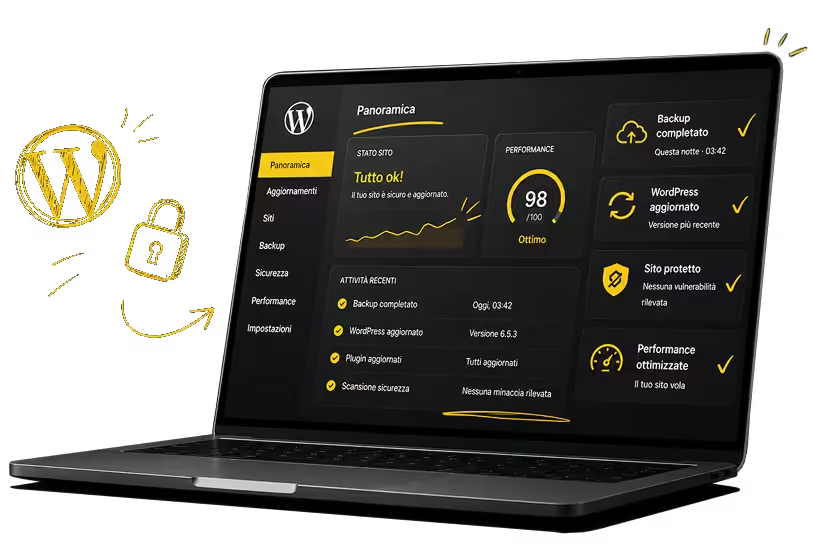
Is this the principle behind WeggPressthe WordPress specialist team at Wegg Agency deals with Updates, security, Backup, hosting and Support Technique of your WordPress site, also including the troubleshooting when an update crashes something.
It is a monthly and constant support, designed for those who want an up-to-date website without having to manually check every notification. You can find out how the service works and what it includes on the dedicated page at WeggPress.
If instead the site has already shown signs of compromise (suspicious slowdowns, spam pages, browser warnings) we recommend starting by reading this article on our blog: Hacked WordPress site: what to do to restore security.

1 subscription 0 worries
With WeggPress your WordPress site is managed every month by professionals, with updates, security, backups, hosting and support included.
The risks of a missed or incorrect WordPress update: the 5 most frequently asked questions
Some doubts crop up more often than others when talking about WordPress updates.
Here are the answers to the most common questions, useful both for understanding your site's risk level and for guiding you on what to do.
1. What happens if I never update WordPress?
The site accumulates known security vulnerabilities, becomes an easier target for automated attacks and risks malfunctioning when, sooner or later, an update becomes essential to continue functioning properly.
2. How often should WordPress, the theme and plugins be updated?
Updates should be checked regularly, ideally on a monthly basis, verifying compatibility and always having a recent backup to hand before proceeding. A site left unchecked for months accumulates a risk that grows over time.
3. Are WordPress automatic updates safe?
They can reduce the risk of falling behind with versions, but they do not eliminate the possibility of incompatibility with specific plugins or themes. For this reason, they should still be monitored by someone capable of intervening in the event of problems.
4. What do I do if an update breaks the site?
A recent backup is needed from which to restore the site and, in parallel, to figure out which component caused the conflict before reapplying the update. This is one of the reasons why entrusting management to a dedicated technical team reduces downtime and the risk of errors.
5. How do I know if my WordPress site has updated correctly?
You can check directly from the WordPress dashboard if there are any pending updates for the core, theme and plugin. If you are not sure that this check is done regularly, it is a sign that the site needs structured technical management.